Skip to content
Turnkey CRM and phone system in one solution CRM and phone system

The call centre CRM that always knows who to call, and when.

Campaigns, inbound queues and callbacks in a single Workstation, with the phone system already built in. Agents call with one click, supervisors watch the shift live, and the system enforces the telemarketing rules.

  • Outbound, inbound and blended campaigns
  • Phone in the browser: a PC and a headset are all you need
  • A dedicated installation for every customer
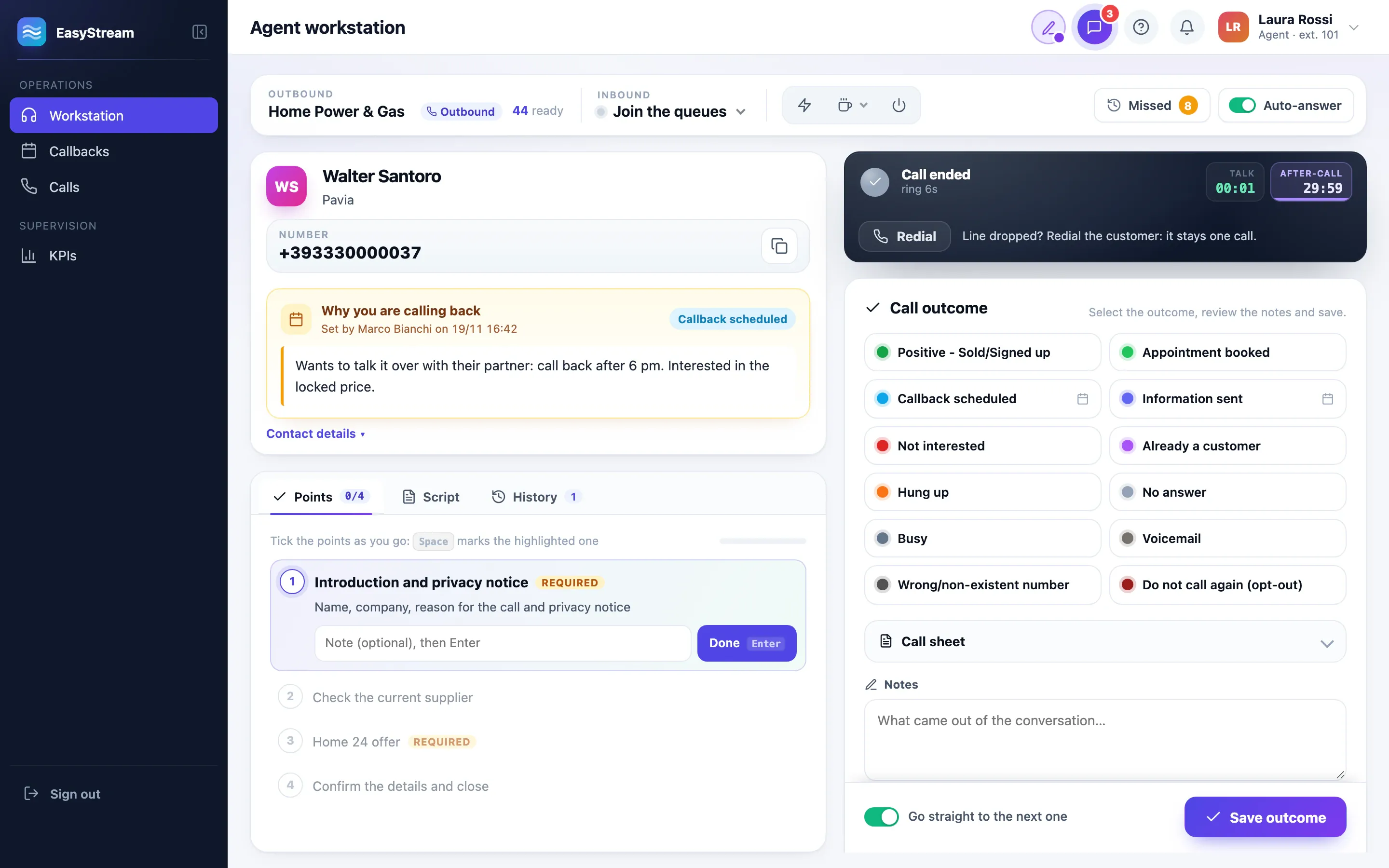
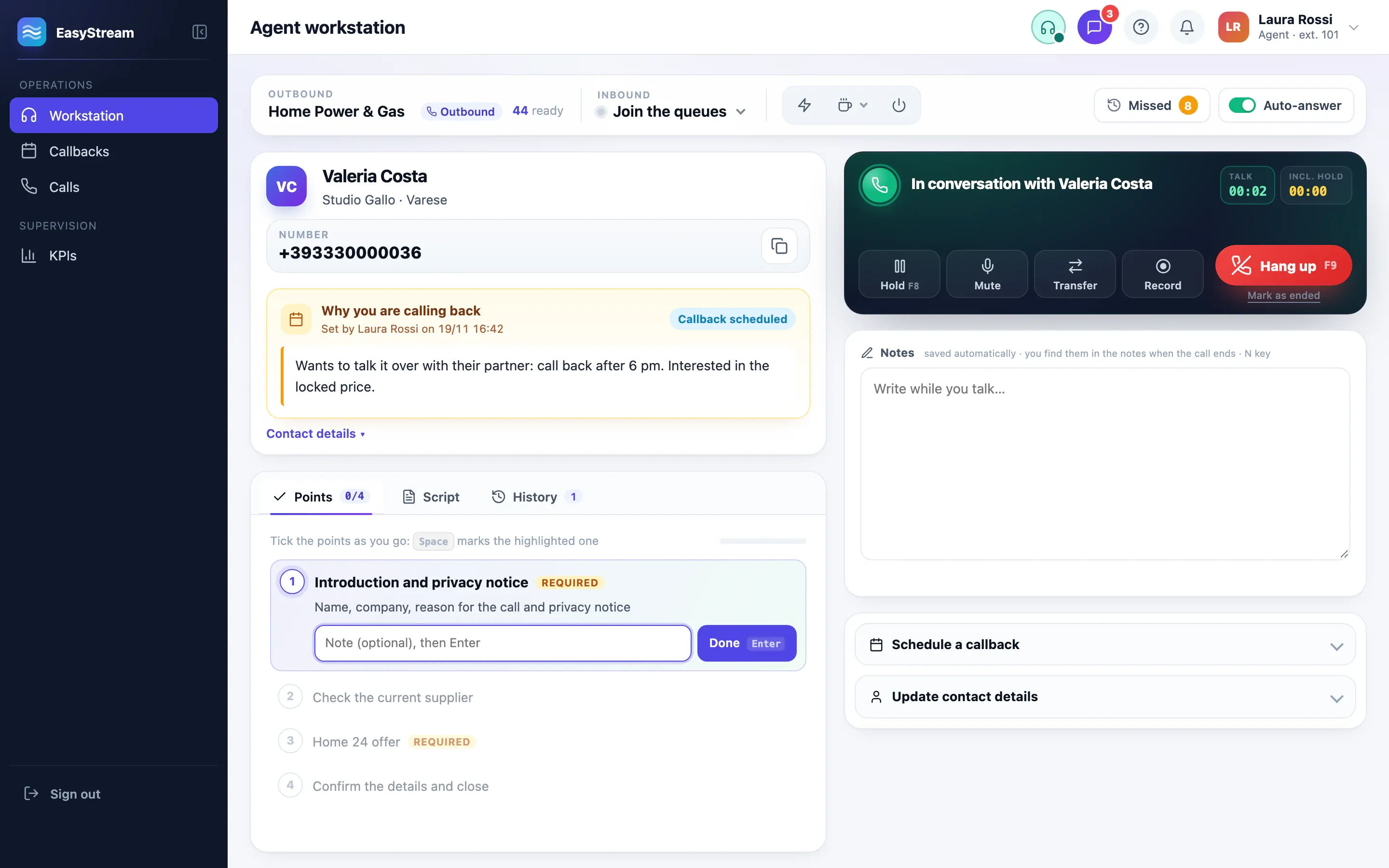
The EasyStream Workstation during a call: on the left, the contact card with the reason for the callback and the talking points; on the right, the console with the talk time, hold, mute, transfer, recording and the hang-up button.

Built for people who work the phones every day

  • Outsourced call centres

    Several clients, each with their own campaigns, their own opt-outs and their own API keys.

  • Sales and appointment setting

    Lists from Excel, retry attempts, agreed callbacks and calls that dial themselves.

  • Customer service

    Inbound queues with their service level, missed calls to return and the history of every call.

The problem

The questions a call centre asks every day. With the answer ready.

A call centre loses time and quality in the gaps between one call and the next: who to call, when to call back, what can be said, who is doing what. EasyStream fills those gaps with clear rules that are the same for everyone.

  • “Who do I call now?”

    The queue chooses for everyone, by the same rules.

    First the callbacks that have come due, then the people who asked to be called, then the priorities set by the supervisor. Nobody gets to pick the easiest contact.

  • “I promised I’d call back at three…”

    The callback comes back on its own, right on time.

    At the agreed time the Workstation puts it ahead of everything else, with the reason written by whoever set it. A reminder arrives five minutes before.

  • “How is the shift going?”

    You see it now, not tomorrow morning.

    The monitor refreshes every three seconds: who is on a call, who is entering an outcome, who is on a break and for how long, how many customers are waiting in the queue.

  • “Were we allowed to call this number?”

    If it can’t be called, it never reaches the Workstation.

    Opt-outs, lists still to be checked against the opt-out registry, consent, calling hours and per-number limits stop the contact before the call, not after.

  • “What do I say to this objection?”

    The AI assistant finds the answer in your documents.

    It searches the contact card and the campaign documents, cites its sources and suggests a sentence to say to the customer. If something isn’t there, it doesn’t make it up.

  • “Which figure is the right one?”

    One definition for every metric.

    Answered calls, useful contacts, positive outcomes, service level, occupancy: every KPI says what it counts, and it is always compared with the previous period.

Features

All the work of a call centre, in one place.

From the list imported from Excel to the saved outcome, from the inbound queue to the end-of-month report: EasyStream covers the whole cycle, with the phone system connected.

01 For agents

The Workstation

One page, for the whole day.

On the left, the contact, with the talking points, the script and the call history. On the right, the call, with hold, mute, transfer and recording. Afterwards, the outcome decides what happens next: a callback, a new attempt or a closed contact.

  • One click on Call, and the phone system connects the agent to the customer.
  • Notes that save themselves while you talk, even if you reload the page.
  • Mandatory talking points: the campaign can require them before a positive outcome.
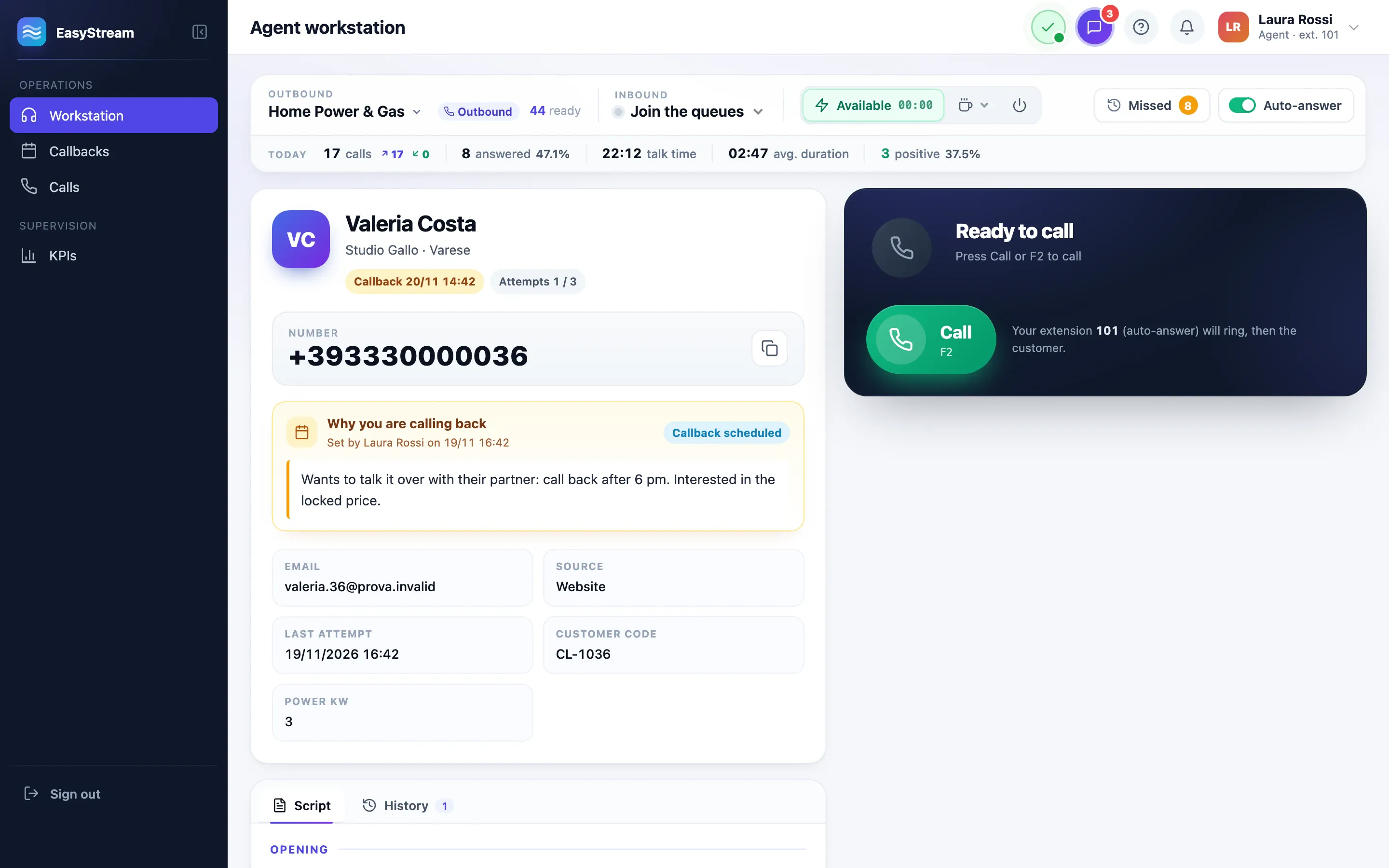
The Workstation with a contact ready to call: the contact card, the reason for the callback and the Call button.
  • F2 Call
  • F4 Next contact
  • F8 Hold
  • F9 Hang up

Automatic calls

The call dials itself. The agent is already on the line.

The Workstation shows the card, counts down a few seconds and dials. No answers, busy lines and numbers that don’t exist are closed without wrap-up: the agent only talks to people who pick up, one call at a time.

  • Card preview from 0 to 60 seconds, maximum ringing from 15 to 30, campaign by campaign.
  • A voicemail? One key, and the “Voicemail” outcome is saved.
  • After five minutes with no activity the round stops and asks “Are you still there?”.
  • In blended campaigns the inbound queue takes priority over outbound calls.

AI assistant during calls

The right answer, while the customer is on the line.

A price, a condition, how to handle an objection: the assistant searches only the contact card and the campaign documents, cites its sources and suggests a sentence to say. If the information isn’t there, it says so.

  • The provider you prefer: Claude, ChatGPT, Gemini, or a model on your own server with Ollama.
  • Confidentiality: if you choose, names, numbers, email addresses, IBANs and tax codes are removed from the question before it leaves your company.
  • Spending under control: limits on questions per day and per call, and a monthly cap.
  • Off by default: the administrator switches it on, even just for some campaigns.
  • Scripts and talking points

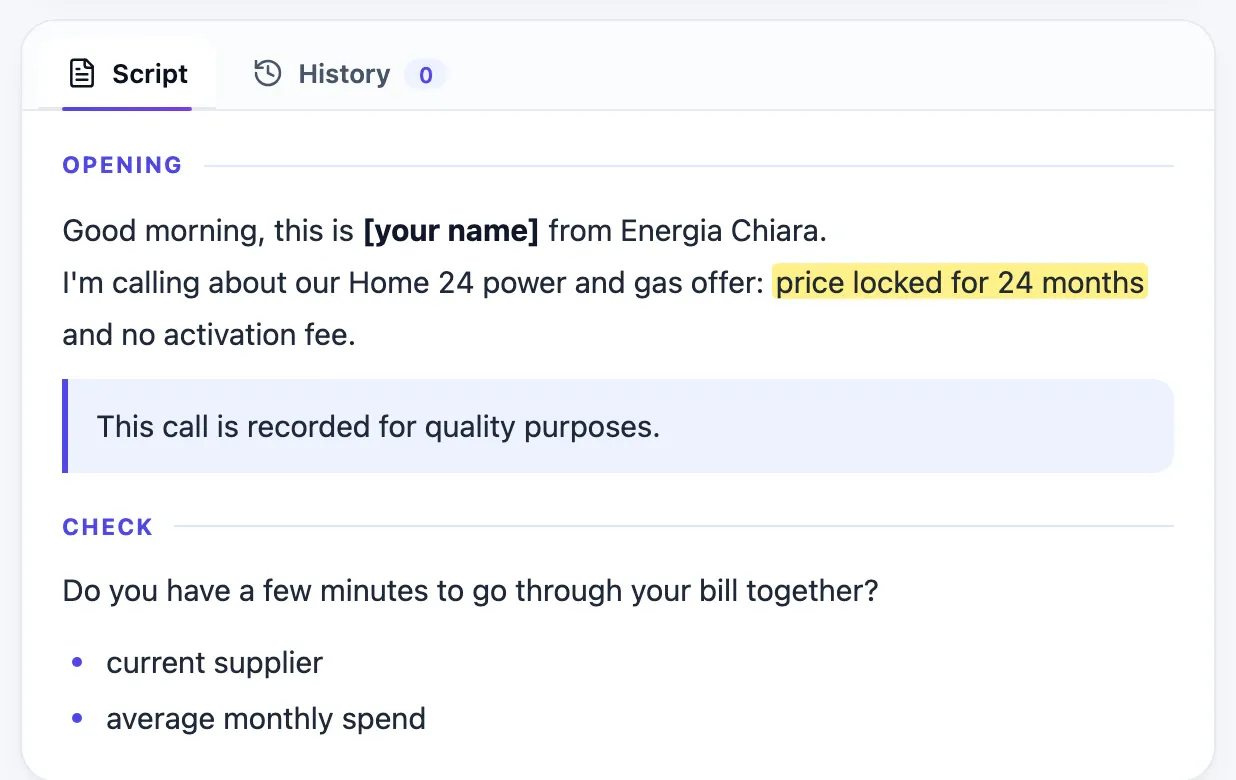
    Headings, bold and highlighting for the words that matter, and boxes to be read word for word, like the call recording notice.

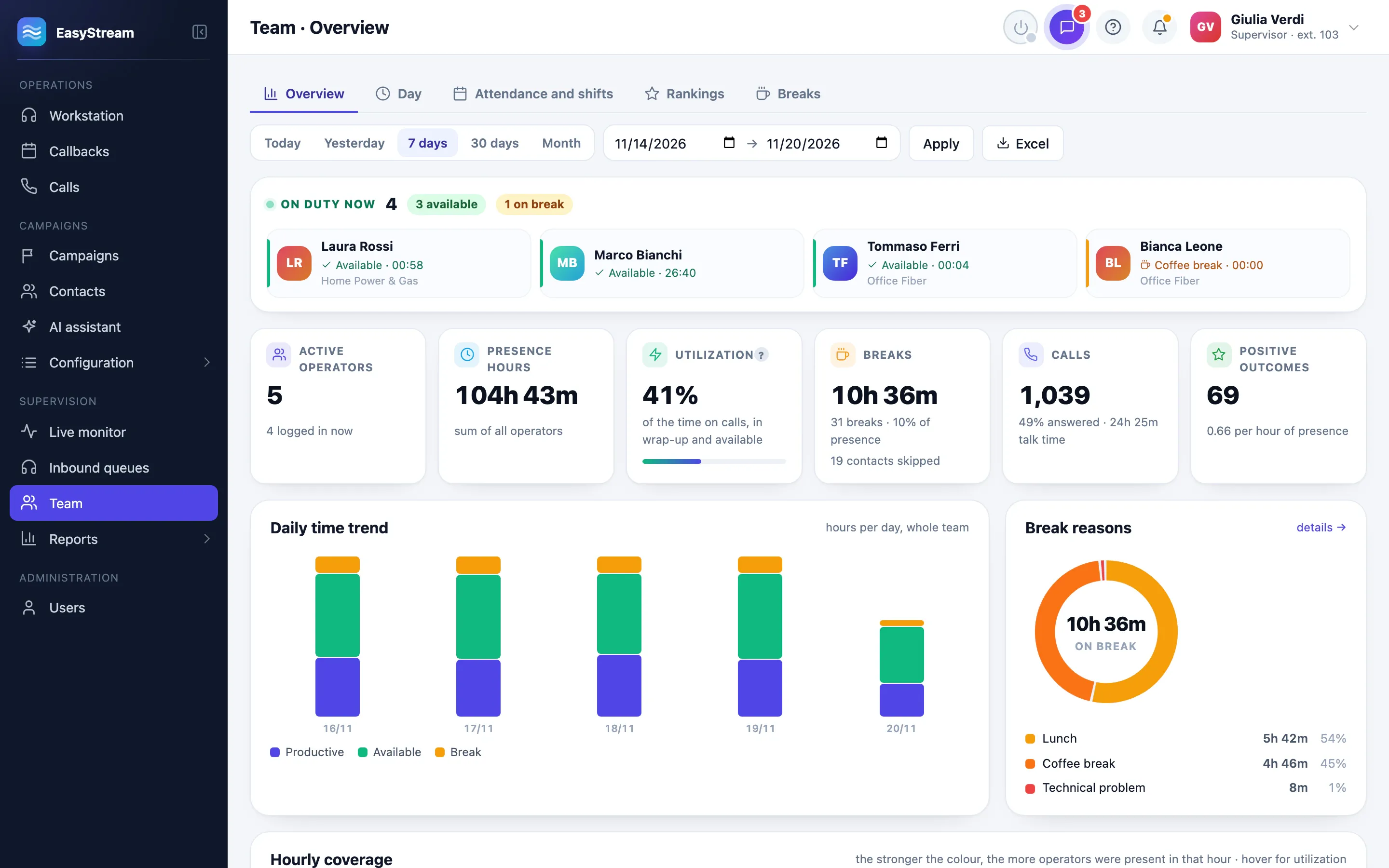
    A campaign script in the Workstation: the Opening and Check headings, the highlighted price and the box with the call recording notice.
  • Callbacks with reminders

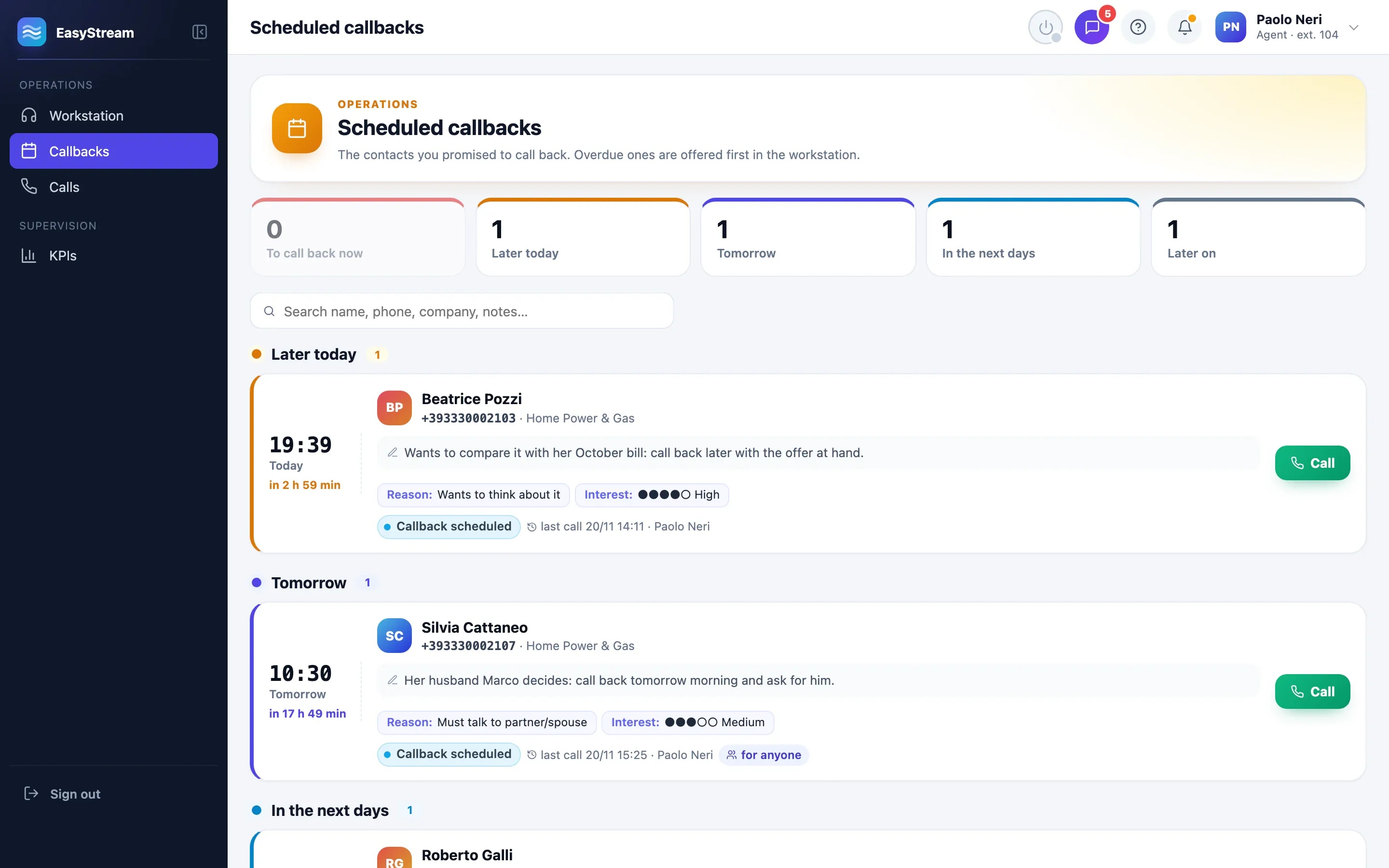
    Five minutes before and right on time, with a sound. The Callbacks page sorts them by due time.

  • Phone in the browser

    The PC with a headset becomes the phone. With Chrome or Edge, call centre headsets answer with their own buttons.

  • Chat with colleagues

    A message to a colleague, to the supervisor or to everyone, without leaving the page.

  • Alerts you can hear

    Sounds, pop-ups and browser notifications for incoming calls, chat and callbacks.

02 For team leaders

Live monitor

The shift, as it happens.

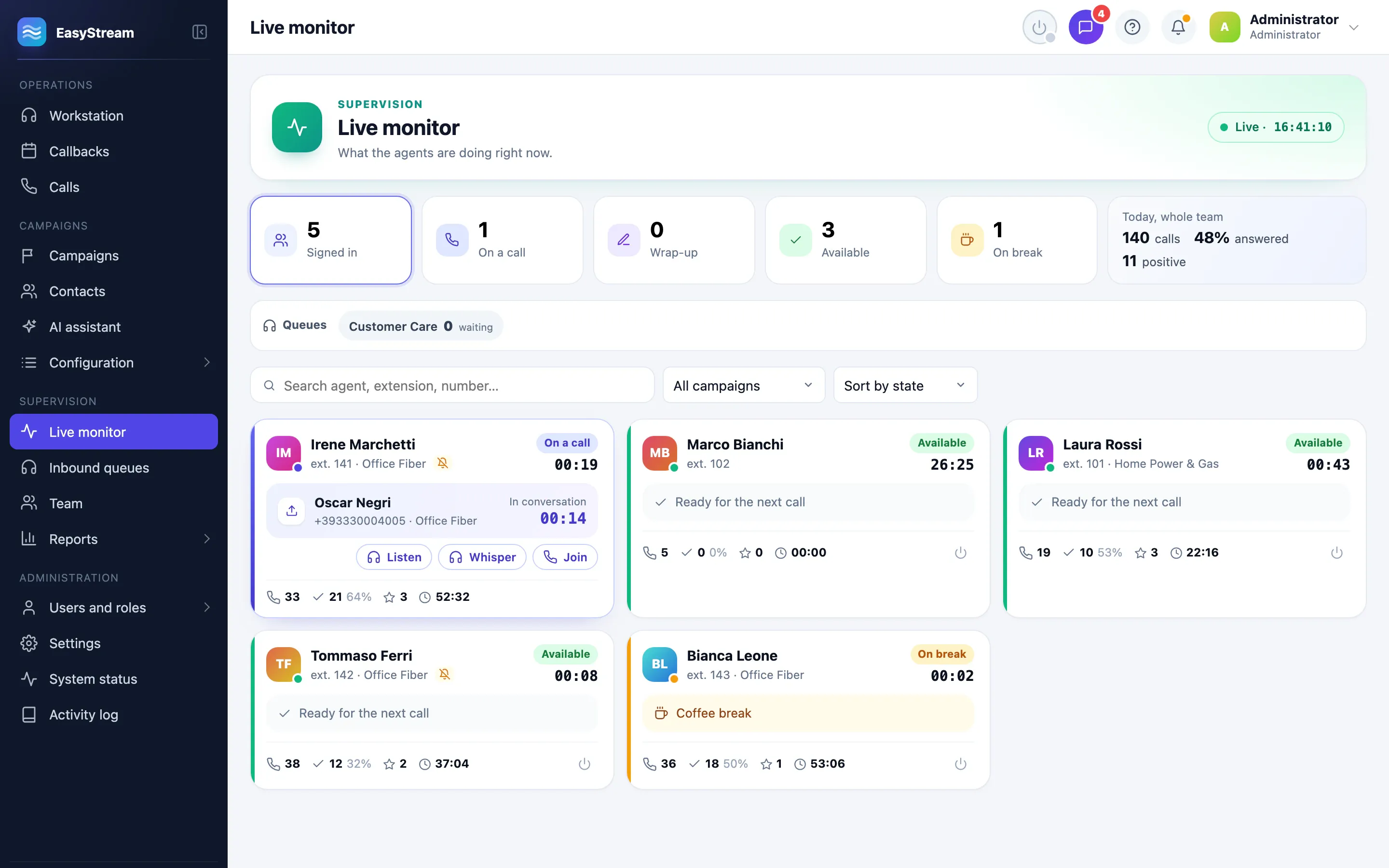
Who is talking, who is entering an outcome, who is available, who is on a break and for how long. The queues, with the customers waiting. And, when needed, you join the call.

  • Listen, whisper and join: hear the call, speak to the agent only, or talk to both.
  • Every intervention is recorded in the activity log and in the call history.
  • Off by default: they are switched on only if your agreement with employees provides for it.
  • Timers that change colour when a break or a wrap-up runs too long.
The live monitor: tiles with the agents signed in, on a call, in wrap-up, available and on a break, and the agent cards with the Listen, Whisper and Join buttons.

Inbound queues

No missed call is left without a follow-up.

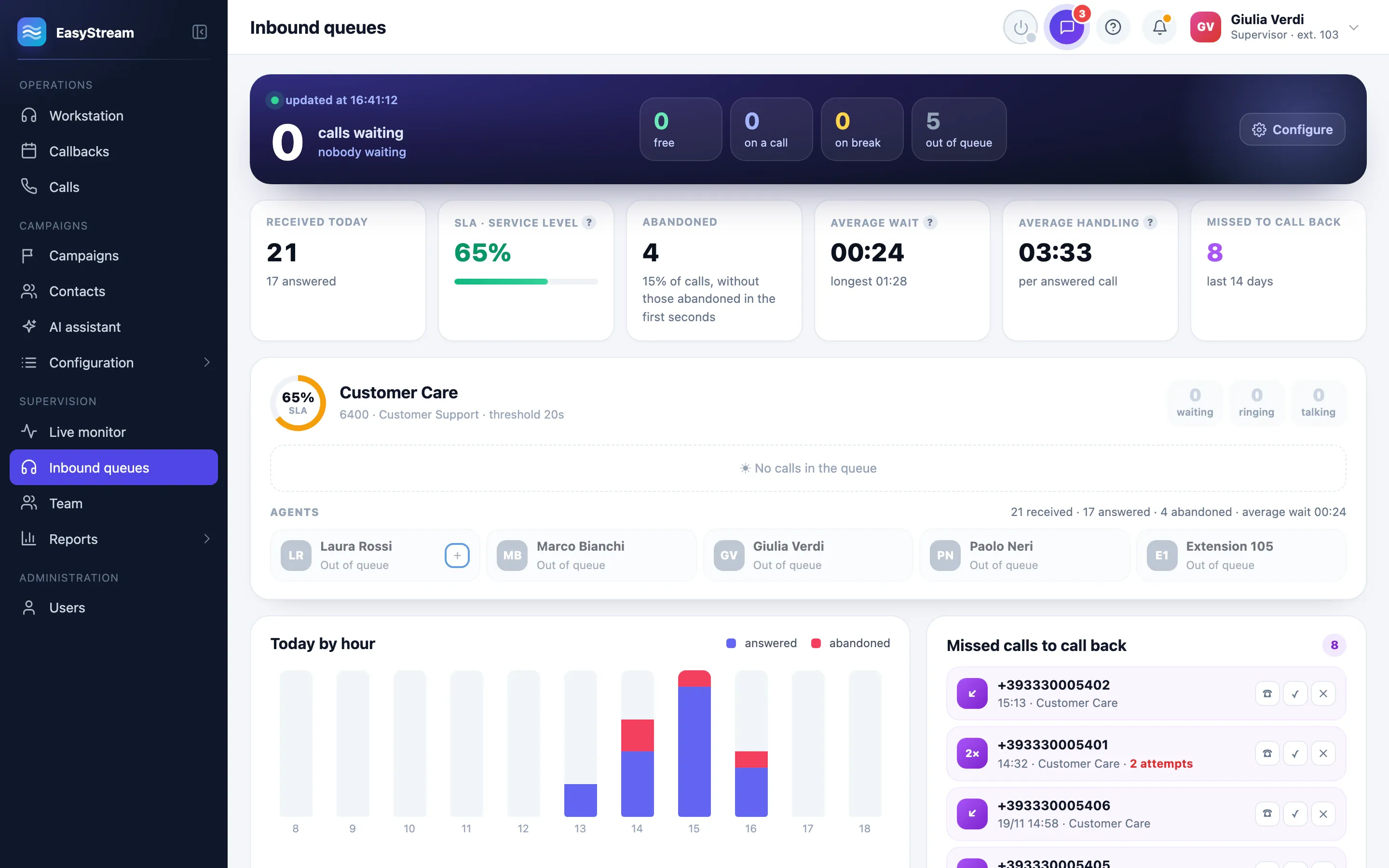
For every queue: who is waiting and for how long, who can answer, today’s service level. Missed calls go into a list to call back, one line per number, and are returned from the Workstation.

  • Service level at a glance: green from 80%, yellow from 60%, red below.
  • Agents in and out of queues from the Workstation, breaks included.
  • When the queue is full, outbound calls stop, if the queue is set up that way.
The inbound queues: the customers waiting, today’s figures with service level and abandoned calls, the queue card and the missed calls to return.

KPIs and Team

Figures everyone reads the same way.

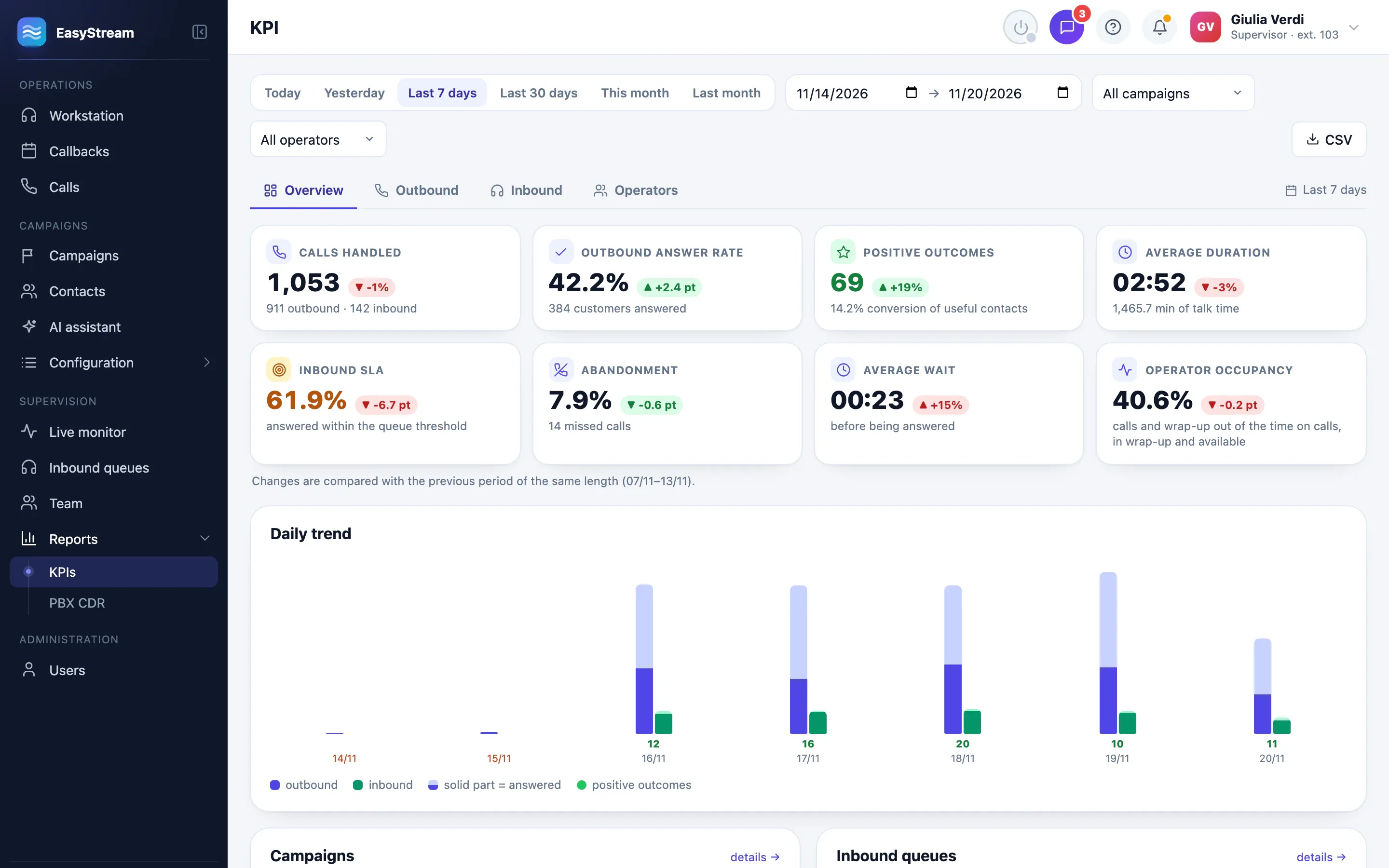
Calls, answered calls, useful contacts, positive outcomes, average duration, service level, occupancy: every metric has its own definition, and it is compared with the previous period. The Team page shows attendance, shifts, breaks and rankings.

  • From attempt to result: the outbound call funnel, step by step.
  • Agreed callbacks made on time, late or not at all.
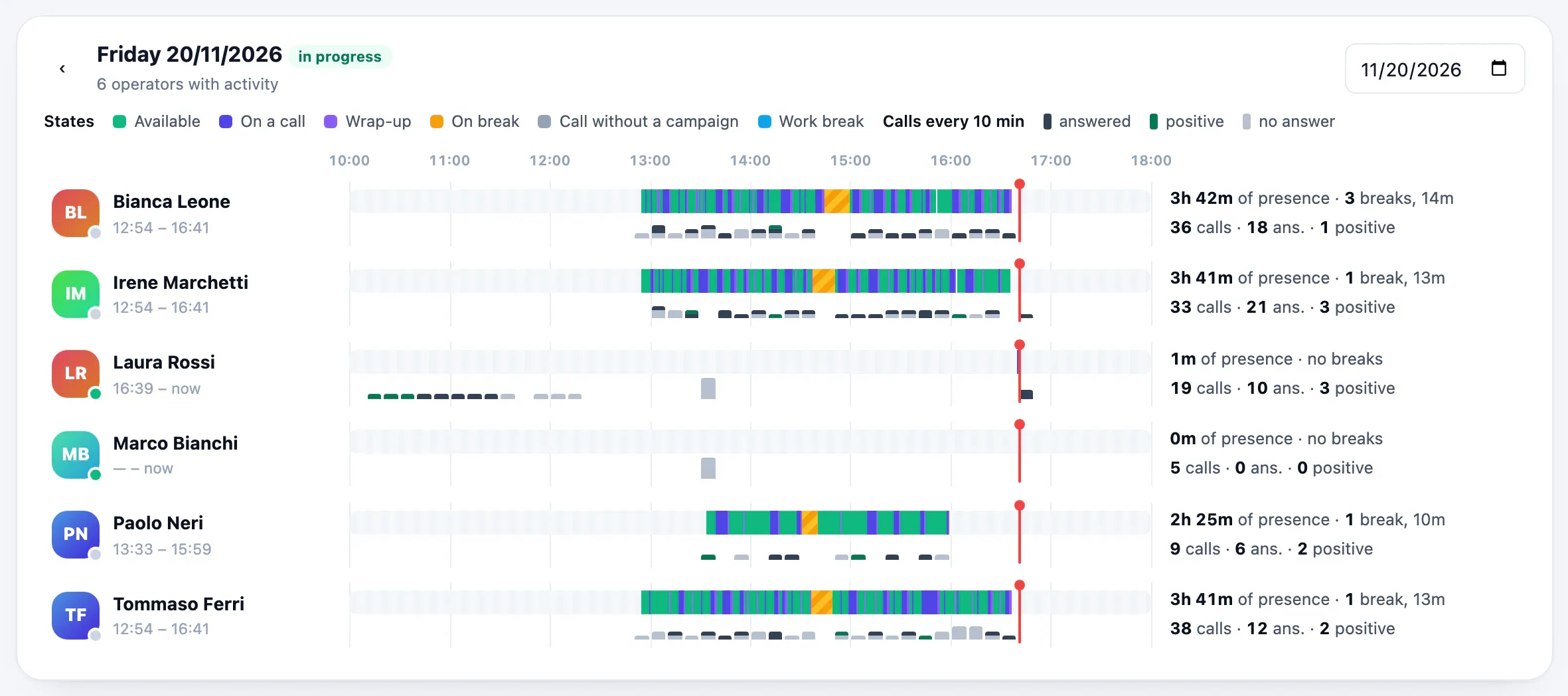
  • Each agent’s day on a timeline, with a zoom.
  • Exports to CSV and Excel, and the end-of-day report by email.
The KPIs for the last 7 days: calls handled, outbound answer rate, positive outcomes, average duration, inbound service level, abandonment, average wait and agent occupancy, each with its change.
The team’s day: a timeline for each agent, with their statuses and calls.

03 For those accountable for compliance

Telemarketing rules, built into the system.

They don’t depend on the caller’s memory: EasyStream applies them before the call goes out, and keeps track of who did what.

  • Public opt-out registry

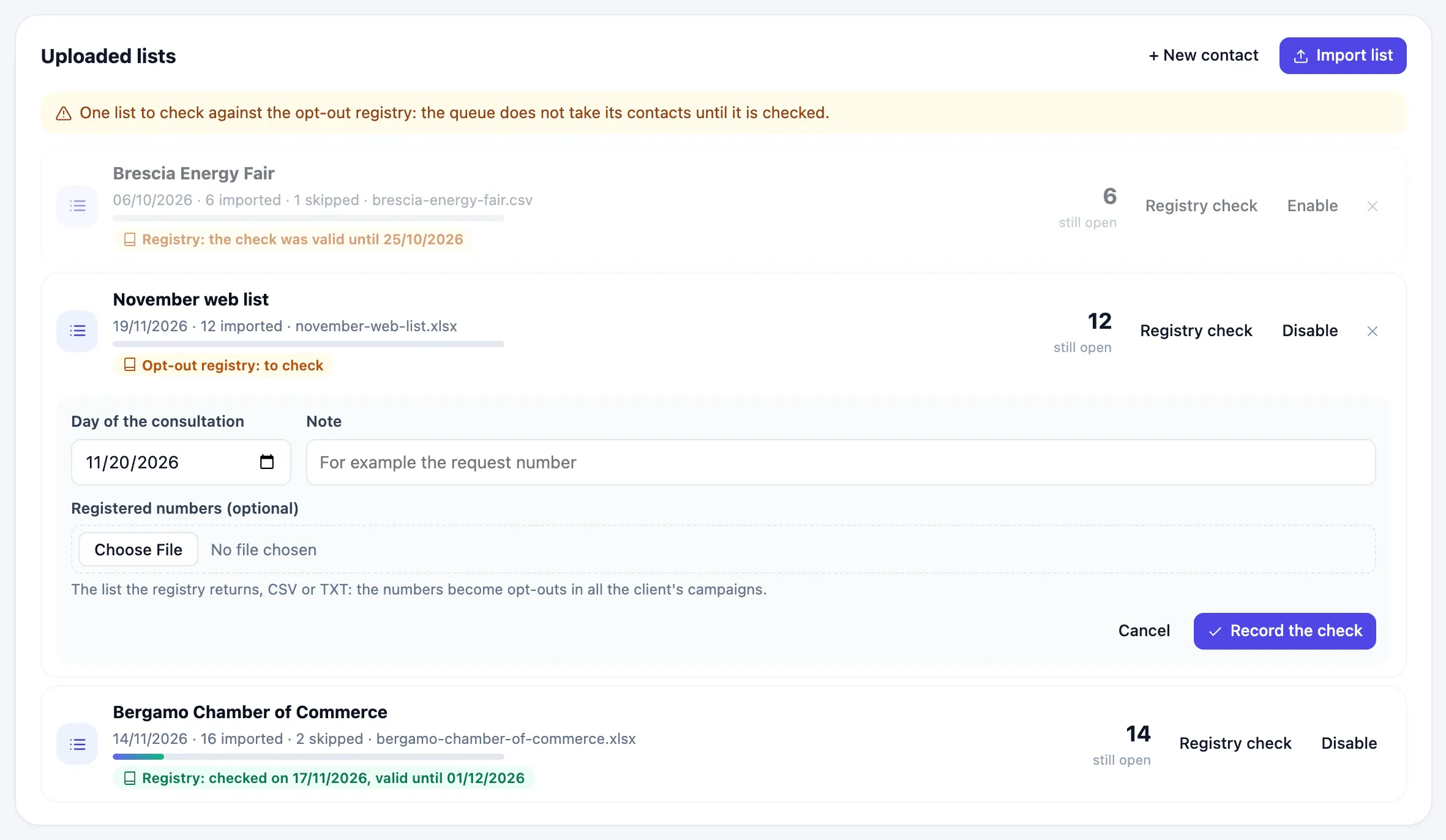
    Every imported list is checked against Italy’s public opt-out registry: until the check is recorded, the queue doesn’t take its contacts. A check is valid for 15 days, and the badge shows until when.

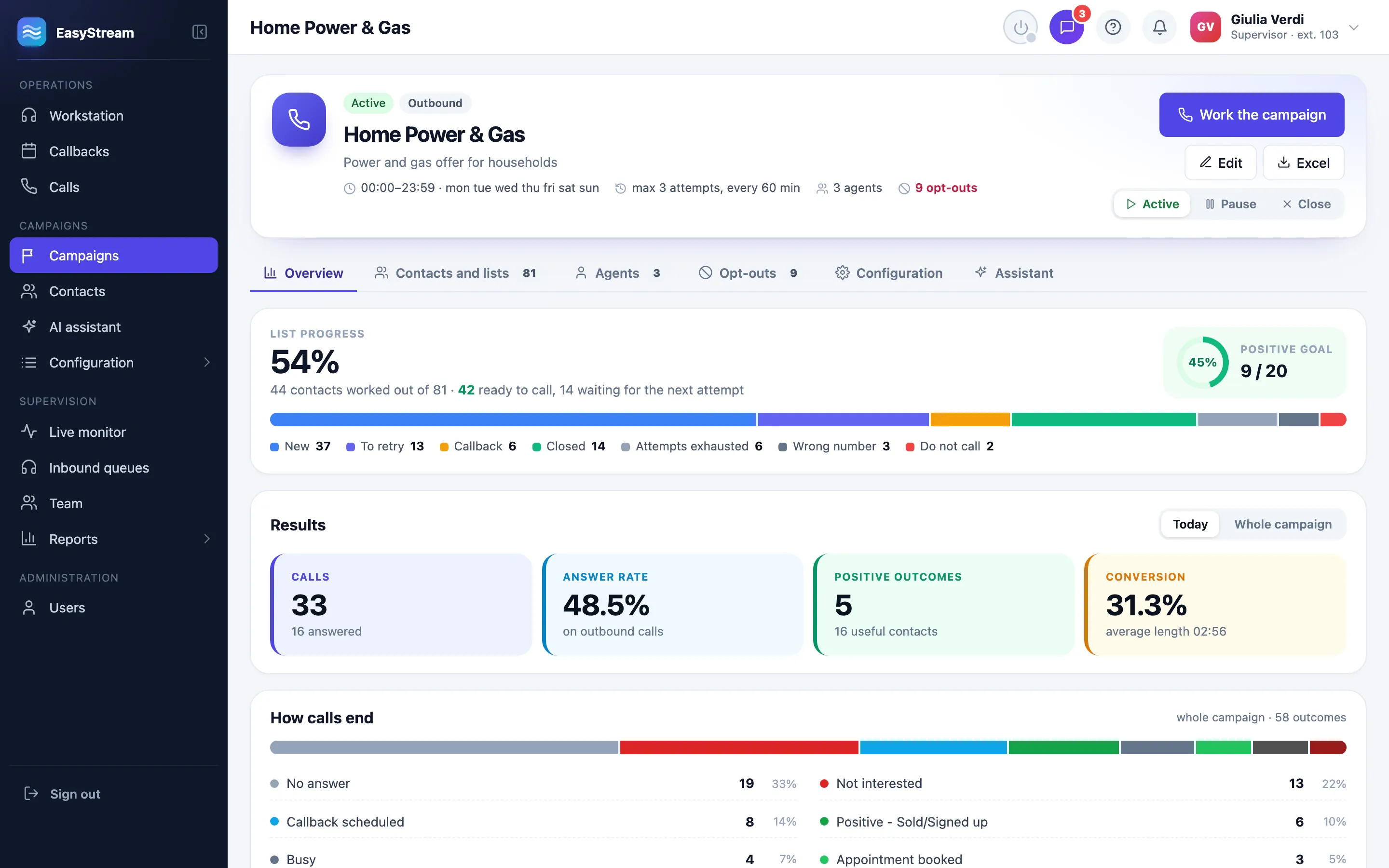
    The lists of a campaign with the opt-out registry check: a list still to be checked, the check form and a list already checked.
  • Code of Conduct calling hours

    One click restores the calling hours of the Italian telemarketing Code of Conduct, with the national public holidays and your own.

    Monday–Friday
    9:00–20:00
    Saturdays and days before holidays
    10:00–19:00
    Sundays and public holidays
    no calls

    Outside these hours, calls go out only as an exception, with permission, a reason and an entry in the log.

  • Opt-outs per client

    A “Do not call again” or a “no” to marketing during a call blocks the number in all of that client’s campaigns. The same number, written another way, stays blocked.

  • Confirmed consent

    A “no” to marketing is confirmed when the outcome is saved. A campaign can be limited to people who have given their consent.

  • Retention and data rights

    A retention period for every type of data, applied overnight. For any number: an Excel export of its data, or the erasure of its personal data.

  • Transparency with agents

    Workplace monitoring is off by default. Agents read and acknowledge their privacy notice with one click, and the activity log shows who did what. These are choices with legal implications: you make them with your lawyer and employment adviser, and EasyStream applies them and keeps track.

The software

EasyStream, live.

Real screens from the application, as agents, supervisors and administrators see them. Names and figures are demo data.

The call in progress: the contact with the reason for the callback, the talking points and the console.

The Workstation during a call: the contact card with the reason for the callback, the talking points, the console with the call timers and controls, and the notes.

Integrated telephony

We bring the phone system. You focus on the calls.

EasyStream comes turnkey: we supply the phone system, already connected to the CRM, which controls it and receives its events in real time. For you it is seamless: the agent has a button, the supervisor has the history of every call.

  • Calls, from the CRM

    Call, hold, mute, transfer and recording are all controlled from the Workstation.

  • Extensions and queues, created for you

    Create a user or a campaign in EasyStream, and it creates the extension and the queue on the phone system, inbound routes included.

  • Every call, with its history

    The calls logged by the phone system are linked to the ones in the CRM, with the timeline of every step.

  • System status

    Phone system, lines, disk, backups and real-time events on one page, with the things to check at the top.

  • Caller ID per campaign

    The number your customers see when you call them is chosen campaign by campaign.

  • API and webhooks

    Requests from your website go to the top of the queue; your business software receives the outcome of every call.

Why EasyStream

Built for people who spend the day on the phone.

A call centre doesn’t need another program to fill in, but one that does the work for it: one that knows who to call, what is allowed and what has happened.

See it on your own case
  1. Turnkey, telephony included

    Not a CRM you have to connect a phone to: we supply the phone system, already integrated. EasyStream controls it, reads its events in real time and creates its extensions and queues.

  2. Italian rules, built in

    The public opt-out registry, Code of Conduct calling hours, marketing consent and data subject rights are product features, not procedures to remember by heart.

  3. An installation all your own

    Every customer has a dedicated installation, with its own database and encrypted backups stored off the machine. No data shared with other companies.

  4. Comfortable for eight hours straight

    Keyboard shortcuts for every action, a single page for the call, sound alerts and notifications: the Workstation is made for people who use it all day.

  5. Learned from the inside

    The user guide is inside the application: a “?” on every page with the articles for that page, and a guided tour of the Workstation on first sign-in. In Italian and English.

  6. Secure by default

    Two-step verification for the roles you choose, role-based permissions, an activity log, and an interface that people who haven’t signed in can’t even download.

How it works

From the first phone call to the first campaign.

Four steps, with someone from our team at your side.

  1. Step 1

    Request a demo

    Fill in the form: we’ll get back to you to set up a meeting and understand how your call centre works.

  2. Step 2

    See EasyStream on your own case

    A tailored presentation: campaigns, queues, controls and reports designed around the way you work.

  3. Step 3

    We define the configuration

    Campaigns, queues, roles and controls: we decide together what you need. We prepare the server and the phone system, already connected to each other.

  4. Step 4

    You start in trial mode

    The installation starts in trial mode: you try out campaigns and calls, the test data is cleared, and you go live when you are ready.

Frequently asked questions

The answers, before the demo.

What people evaluating EasyStream ask us. For anything else there’s the form: someone from our team will answer you.

Ask your question
Do I need a phone system?

No, you don’t need to find one or connect one. EasyStream is a turnkey solution: we supply the phone system, already integrated with the CRM. For you it is seamless: you create users and campaigns in EasyStream, and the extensions and queues are set up on their own.

Do we need to install software on the agents’ PCs?

No. EasyStream runs in the browser. To make calls, agents can use the phone in the browser, that is the PC with a headset, the app on their computer or mobile, or a desk phone. With Chrome or Edge, call centre headsets answer and hang up with their own buttons.

Does it handle both outbound and inbound calls?

Yes. Every campaign is Outbound, calling its lists, Inbound, taking calls from the queues, or Blended, doing both. In Blended campaigns the inbound queue takes priority over outbound calls.

Where is the data kept?

Every customer has their own installation: a dedicated server with its own database. Backups are encrypted and stored off the machine. Call recordings stay on the phone system.

Does EasyStream comply with the GDPR and the telemarketing rules?

It gives you the tools to do so: list checks against the public opt-out registry, opt-outs per client, consent confirmed during the call, a calling calendar, retention periods for every type of data, export and erasure of a number’s data, and an activity log.

The choices, such as retention periods or workplace monitoring, are yours to make with your lawyer and employment adviser: EasyStream applies them and keeps track.

We work for several clients: is their data kept separate?

Yes. Every campaign belongs to a client: opt-outs, API keys and webhooks apply only to that client’s data, and KPIs and pages can be filtered by client. As long as there is only one client, the interface doesn’t mention it.

Does it connect to our business software or our website?

Yes, through the API: another application can read campaigns, outcomes and calls, and add contacts. A contact request from your website goes ahead of the others in the queue. With the webhook, your system receives the outcome of every call as soon as it is saved.

What does the AI assistant see?

Only the contact card and the campaign documents the supervisor gives it. If you choose, the contact’s name, number, email address, IBAN and tax codes are removed from the question before it leaves your company. You can use Claude, ChatGPT, Gemini or a model on your own server with Ollama. It is off by default.

Can supervisors listen in on calls?

Only if you switch it on: listen, whisper and join are off by default, and are enabled when your agreement with employees provides for it. Every time someone joins a call it is recorded in the activity log, and agents know about it from the privacy notice they acknowledge in the Workstation.

How do agents learn to use it?

With the user guide inside the application: more than fifty articles, a “?” on every page with the articles for the page you are on, and a guided tour of the Workstation the first time it is opened. The interface is in Italian and English.

How much does it cost?

It depends on the configuration that suits your call centre. After the demo we prepare a tailored proposal for you: request it with the form.

Request a demo

Let’s take a look at your call centre.

Tell us how you work: campaigns, queues, how many agents. We’ll get back to you to schedule an EasyStream demo based on your case.

  1. We get back to you to schedule the demo on the day and at the time you prefer.

  2. We show you EasyStream applied to the way you work, with your questions.

  3. We prepare a proposal tailored to you, turnkey.

Request a demo

All fields are required, except the message.

We only use your details to get back to you. No commitment.